
Amazon Closed Your Support Case — But Did They Actually Fix the Problem?
9/13/2026
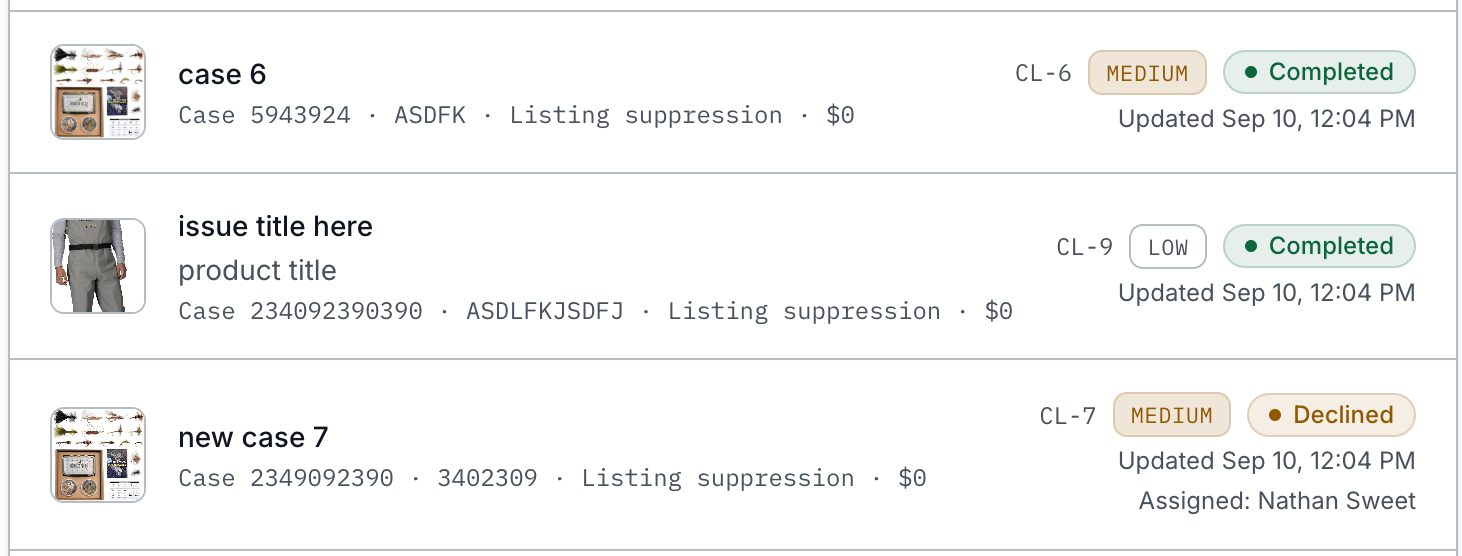
If you have managed an Amazon business for any length of time, you have probably experienced a support case being closed before the actual problem was resolved.
You discover an issue, open a case with Amazon, exchange messages with support, provide the requested information, and eventually receive a notification that the case has been closed. The only problem is that the listing is still suppressed, the variation is still broken, the inventory discrepancy still exists, or the reimbursement still hasn't appeared.
This is one of the most frustrating parts of operating a business on Amazon, but it also exposes a fundamental problem with how many companies manage Amazon support.
Amazon naturally organizes its support system around individual case IDs. Your business, however, shouldn't necessarily organize its internal process the same way. Amazon cases are conversations used to solve a larger business issue. The issue itself is what ultimately matters.
A Case Is Not the Same as an Issue
Consider a common scenario. One of your top-selling ASINs suddenly becomes suppressed.
Your team opens an Amazon support case and provides the requested information. Amazon responds, but the response doesn't resolve the suppression. Eventually, the case is closed.
Your team opens another case, explains the situation again, and references the previous case. The second case gets transferred to another department and eventually closes as well. Someone on your team then opens a third case or attempts another escalation.
At this point, you have three Amazon case IDs, but you don't have three separate business problems. You have one problem: a revenue-generating ASIN isn't available for customers to purchase.
This distinction matters because traditional case tracking can fragment the history of the problem. If every Amazon case is treated as an independent record, someone reviewing the account later may need to open several cases and piece together the sequence of events. They have to determine what Amazon originally said, what your team submitted, which approaches failed, what was escalated, and whether anything was ever actually resolved.
A better approach is to make the business issue the primary record and treat Amazon case IDs as part of that issue's history.
Amazon's Definition of "Closed" Doesn't Have to Be Yours
Amazon closing a support case should not automatically mean your organization considers the issue resolved.
Your team needs its own definition of resolution based on the actual business outcome.
For example:
- If an ASIN was suppressed, the issue should remain open until your team confirms that the product is live and purchasable again.
- If you're pursuing a reimbursement, verify that the expected amount was actually credited.
- If a variation relationship broke, confirm that the parent-child relationship is displaying correctly on the detail page.
- If an inventory problem caused units to become unavailable, verify that the inventory is actually available again.
- If Amazon made a catalog correction, confirm that the change is visible to customers rather than relying solely on Amazon's response.
This creates an important separation between Amazon's case status and your company's issue status.
Amazon may consider its interaction with your company complete while your organization still has an unresolved business problem.
Why This Becomes Harder as Your Amazon Business Grows
A smaller Amazon business managed by one person can often survive without a formal case-management process. That person may remember which cases are connected, which ASINs have recurring problems, what Amazon said last week, and which escalation eventually solved an issue.
That becomes much harder as the organization grows.
One person may manage catalog and content while another handles supply chain. Finance may be responsible for shortages and reimbursements. An agency or outside partner may also be involved.
Now the history of a single Amazon problem can be spread across:
- Seller Central or Vendor Central
- Spreadsheets
- Email threads
- Slack or Teams conversations
- Screenshots
- Shared folders
- Internal documents
- Individual employees' notes
The problem becomes even more obvious when someone changes roles or leaves the company.
An experienced Amazon manager may have years of account knowledge that isn't documented anywhere. They remember that a particular ASIN experienced the same problem eight months ago. They remember which Amazon case eventually reached the right team. They know which documentation Amazon requested and which attempted solutions didn't work.
If that history isn't captured somewhere, the next person may have to start the investigation from the beginning.
That's not just wasted time. It's lost institutional knowledge.
Track the Business Problem First
Instead of beginning with an Amazon case ID, start by documenting the actual business issue.
For example, your internal record might be called ASIN B0XXXXXX — Listing Suppressed.
That record should contain the information your organization actually needs to manage the problem, including:
- Affected ASINs or SKUs
- Date the problem was discovered
- Assigned owner
- Business impact
- Priority
- Related Amazon case IDs
- Screenshots and supporting documentation
- Internal notes
- Actions already attempted
- Current status
- Next follow-up date
- Final resolution
Every Amazon case associated with that problem can then be connected to the same issue.
If the first case is closed without resolution, the issue stays open. If a second case is created, it becomes part of the same history. If the problem eventually requires an escalation, that interaction becomes part of the same record.
Now someone joining the issue halfway through doesn't have to reconstruct the entire story. They can review one place and understand what happened, what's been tried, and what needs to happen next.
Add a Verification Step to Your Amazon Support Process
One of the simplest improvements an Amazon team can make is adding a formal verification stage before an issue can be marked resolved.
Instead of moving directly from an Amazon response to a closed issue, consider a workflow such as:
- Identified — The business problem has been discovered.
- Investigating — Your team is gathering information and determining the cause.
- Submitted to Amazon — A support case has been opened.
- Waiting on Amazon — Amazon needs to respond or take action.
- Action Required — Your team needs to provide information or complete a requested step.
- Escalated — The original support path has not resolved the problem.
- Verification Required — Amazon says the problem has been corrected.
- Resolved — Your team has independently confirmed the business problem is fixed.
The exact status names aren't particularly important. What matters is having a stage between "Amazon says this is fixed" and "our company has confirmed this is fixed."
Verification might take less than a minute:
- Open the detail page and make sure the product is purchasable.
- Check the account and confirm the reimbursement arrived.
- Review the variation and make sure it displays correctly.
- Verify that inventory is available again.
- Confirm that the requested catalog change actually appears on Amazon.
That additional step can prevent an issue from disappearing simply because the associated Amazon support case changed status.
Amazon Case History Should Become Institutional Knowledge
There is another benefit to organizing Amazon support around issues rather than individual cases. Over time, your support history becomes a valuable operational database.
Your organization can begin identifying:
- Which ASINs repeatedly experience problems
- Which types of issues occur most frequently
- Which issues take the longest to resolve
- Which problems frequently require escalation
- Which issues create the greatest financial or revenue exposure
- Which solutions have worked previously
- Which supposedly resolved problems keep returning
Imagine an ASIN experiences the same problem six months from now.
Instead of starting from scratch, your team can find the previous issue and see exactly what happened. They can review which cases were opened, what Amazon requested, which solutions didn't work, and what ultimately fixed the problem.
Yesterday's Amazon support problem becomes tomorrow's playbook.
This becomes particularly valuable for larger brands, houses of brands, and agencies. A new employee or account manager can understand historical issues without searching through someone else's inbox or asking coworkers if they remember what happened.
The knowledge belongs to the organization rather than the individual employee.
Stop Measuring Success by Closed Cases
There's another shift worth making. The number of Amazon cases your team closes isn't necessarily a useful measure of success.
Imagine Team A opens 100 cases and closes 95 of them. Team B opens 60 cases and resolves nearly every underlying business issue.
Which team performed better?
The answer isn't obvious from case counts alone.
A stronger Amazon operation should care about outcomes such as time to resolution, recurring issues, financial recovery, revenue protected, and whether the underlying problem actually stayed fixed.
This is why separating the case from the issue is so important.
Manage the Issue, Not Just the Case
The most important question your team can ask when an Amazon support case closes is simple:
Did this actually fix the problem?
If the answer is no, your internal issue shouldn't be closed just because Amazon's case is.
This idea is one of the reasons we built Case Layout.
After years of managing e-commerce and marketplace businesses, I repeatedly saw Amazon cases being closed while the underlying listing, inventory, operational, or financial problem remained unresolved. Case numbers, screenshots, responses, and internal conversations could become scattered across different systems while the team tried to determine what had actually happened.
Case Layout is designed around a different approach. The underlying business issue is the primary record. Related Amazon cases can be connected to that issue along with ownership, documentation, history, status, follow-ups, and the final resolution.
Instead of simply creating a database of Amazon case numbers, your organization creates a history of the problems it has encountered and how they were resolved.
Because ultimately, your business doesn't care whether Amazon closed a support case. It cares whether the problem got fixed.