
How to Build an Amazon Support Case Escalation Process
9/13/2026
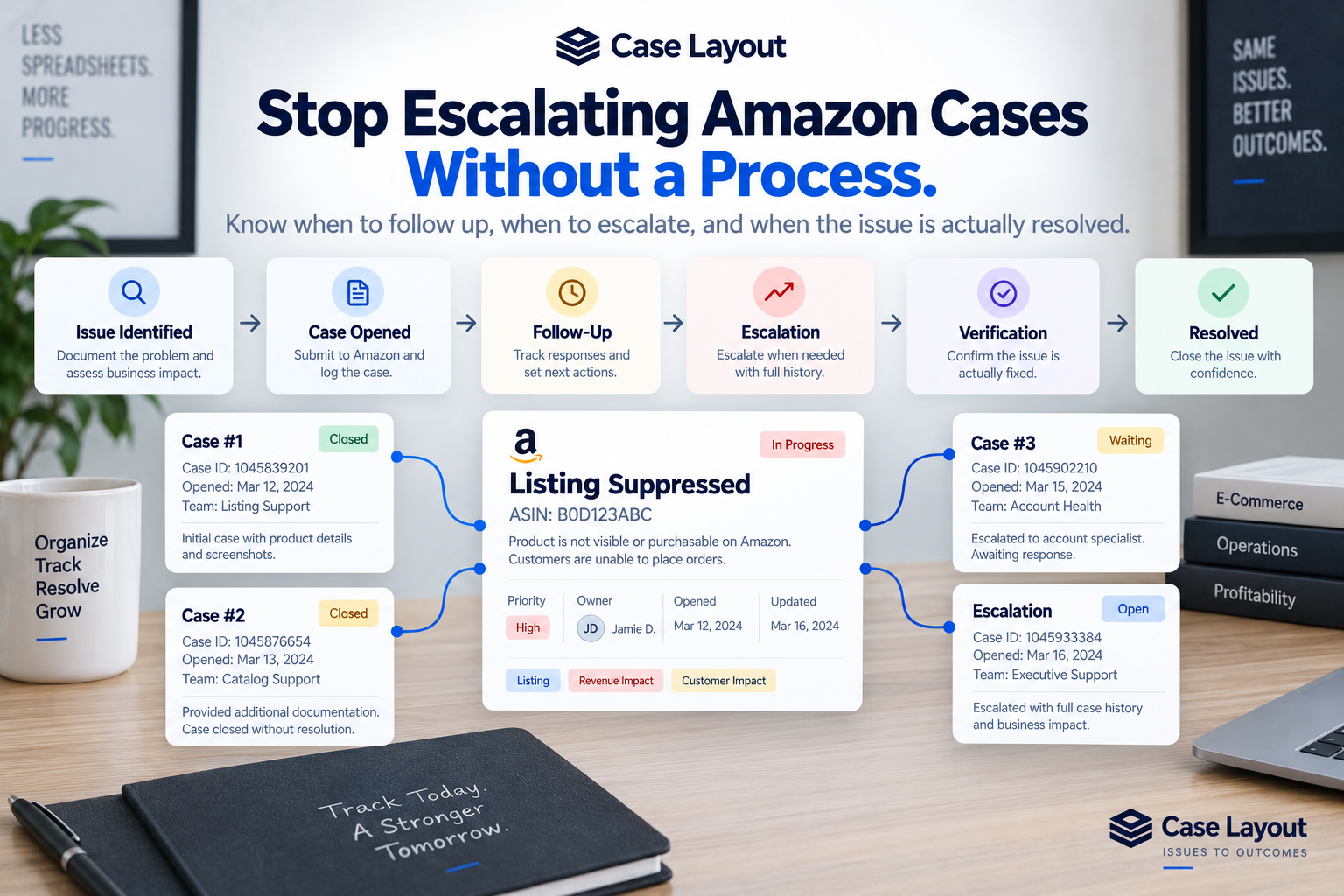
Every experienced Amazon operator eventually encounters a support case that seems to go nowhere.
You clearly explain the problem. Amazon responds with an answer that doesn't address it. You provide additional information. Another associate responds. The case gets transferred. Someone asks for documentation you've already submitted. Eventually, the case is closed while the original problem still exists.
Your team opens another case.
Then another.
At some point, the question becomes: When should we escalate this?
Without a defined process, Amazon teams tend to fall into one of two patterns. They either escalate problems too quickly without giving the normal support process an opportunity to work, or they allow important issues to sit unresolved for far too long.
A structured Amazon case escalation process creates a middle ground. It gives your team clear expectations for documentation, ownership, follow-up, escalation, and final resolution.
Escalation Should Start Before You Need to Escalate
A good escalation process doesn't begin when your team becomes frustrated with Amazon.
It begins when the original issue is discovered.
The quality of your initial documentation can have a major impact on everything that follows. If the problem eventually needs to be escalated, the next person reviewing it should be able to understand exactly what happened without reconstructing the issue from scratch.
Before opening the first Amazon case, document the business problem as clearly as possible.
Depending on the issue, that may include:
- Affected ASINs or SKUs
- Relevant purchase orders or shipments
- Date the problem started
- Screenshots
- Financial amounts involved
- Inventory quantities
- Supporting documentation
- What your team has already investigated
- The expected business outcome
This creates the foundation for the entire issue history.
If the first Amazon support interaction doesn't resolve the problem, your team already has the information needed to continue.
Step 1: Clearly Define the Business Problem
Before thinking about escalation, make sure your team agrees on what you're actually trying to resolve.
This sounds obvious, but Amazon cases can become complicated quickly.
For example, saying:
"We have a listing issue."
isn't particularly useful.
A better internal issue might be:
"ASIN B0XXXXXX has been suppressed since September 8 and is currently unavailable for purchase."
Now the problem is specific.
You know which product is affected, what happened, when it started, and what the expected resolution should be.
The expected outcome is equally important.
For this example, the outcome isn't simply:
"Amazon responds to the case."
The outcome is:
"ASIN B0XXXXXX is restored and customers can purchase it again."
That distinction should guide the entire escalation process.
Step 2: Assign One Owner
Every significant Amazon issue should have one primary owner.
Several people may contribute to the resolution. Operations may investigate inventory. Finance may provide documentation. Marketing may update product information. An agency may communicate with Amazon.
But one person should ultimately be accountable for moving the issue forward.
The owner should know:
- What the underlying problem is
- Which Amazon cases are related
- What has already been attempted
- What Amazon has requested
- What the next action is
- When the next follow-up should occur
- When escalation is appropriate
- What qualifies the issue as resolved
Without a clear owner, unresolved Amazon cases can easily become everyone's responsibility and therefore nobody's responsibility.
Step 3: Open the Initial Amazon Case
Once the issue is documented and ownership is established, open the appropriate Amazon support case.
Record the case ID as part of the larger business issue.
This distinction matters.
The Amazon case should be connected to the issue rather than becoming the issue itself.
Suppose your listing problem requires three Amazon cases before it's resolved. Your team should still have one business issue with three related case IDs rather than three disconnected problems.
For the initial case, record information such as:
- Amazon case ID
- Date opened
- Person who opened it
- Information submitted
- Supporting documentation
- Amazon team or support path used
- Current status
This gives your team a clean starting point if additional action becomes necessary.
Step 4: Evaluate Amazon's Response
Not every Amazon response moves the problem closer to resolution.
That's an important distinction.
Amazon may respond quickly, but the quality of the response matters more than the speed.
When a response arrives, ask:
Did this response actually move the business issue forward?
Amazon's response generally creates one of several outcomes.
They may fix the problem.
They may request additional information.
They may provide instructions your team needs to follow.
They may transfer the issue to another team.
They may misunderstand the problem.
They may provide a generic response that doesn't address the issue.
Or they may close the case without resolving anything.
Your next action should depend on which of those outcomes occurred.
Step 5: Always Set a Next Action
One of the most common weaknesses in Amazon case management is allowing an issue to sit indefinitely in a status such as:
Waiting on Amazon
Waiting isn't really an action.
Every unresolved issue should have a clear next step.
Examples might include:
- Follow up with Amazon tomorrow.
- Submit requested documentation.
- Confirm product information internally.
- Check the detail page after 24 hours.
- Verify inventory quantities.
- Contact finance for supporting records.
- Escalate if no meaningful response is received.
- Open a related case with another Amazon support team.
The next action tells the owner exactly what needs to happen.
Step 6: Give the Issue a Follow-Up Date
Every unresolved issue should also have a follow-up date.
The appropriate timeline will depend on business impact.
A suppressed top-selling ASIN may require aggressive follow-up because every day represents meaningful revenue exposure.
A minor catalog correction may reasonably have a longer follow-up window.
The important thing is that the timing is intentional.
If the issue is simply marked "Waiting on Amazon" with no follow-up date, your process depends on someone remembering to check it.
As case volume grows, that becomes increasingly unreliable.
A follow-up date creates accountability.
Step 7: Define When Escalation Is Appropriate
Teams should establish basic escalation triggers instead of making the decision entirely based on frustration.
Several factors can indicate that escalation is appropriate.
These may include:
- The issue has significant revenue impact.
- A high-volume ASIN is unavailable.
- Important inventory is affected.
- A meaningful financial amount is in dispute.
- Amazon has provided multiple responses that don't address the problem.
- The original case was closed without resolution.
- Multiple support cases have already been attempted.
- The issue has remained unresolved beyond an acceptable period.
- The same problem has repeatedly returned.
- The issue creates customer or account risk.
Not every issue needs the same escalation threshold.
Business impact should influence escalation speed.
A $30 catalog correction and a $30,000 shortage dispute shouldn't necessarily follow identical timelines.
Step 8: Preserve the Previous Case History
This becomes especially important when your team opens another case.
Don't treat the new Amazon case as a completely new problem.
Connect it to the existing issue.
Imagine the first case is closed without resolution. Your team opens Case #2.
The history should now look something like:
Business Issue: ASIN B0XXXXXX Suppressed
- Case #1 — Opened September 8 — Closed without resolution
- Case #2 — Opened September 10 — Additional documentation submitted
If Case #2 also fails and the issue is escalated, add the escalation to the same history.
Now anyone reviewing the issue can understand the sequence.
Without that connection, the history becomes fragmented across separate Amazon cases.
Step 9: Make the Escalation Easy to Understand
When an issue reaches another Amazon team or a higher level of support, the history should be easy to summarize.
The person reviewing the escalation shouldn't have to decipher weeks of scattered notes.
A strong escalation summary should explain:
- What the business problem is
- When it started
- Which ASINs, SKUs, shipments, or transactions are affected
- Which Amazon cases have already been opened
- What Amazon has previously said
- What your team has already done
- Why the issue remains unresolved
- What business impact the problem is creating
- What outcome you're requesting
This is another reason structured issue history is valuable.
Instead of reconstructing the story every time the issue changes hands, your team already has it.
Step 10: Track Business Impact During Escalation
Escalation priority should also reflect what the unresolved issue is costing the business.
Suppose an ASIN generates approximately $5,000 per day and has been suppressed for four days.
That represents significant potential revenue exposure.
Another case might involve a $150 reimbursement.
Both problems deserve resolution, but they shouldn't necessarily receive the same organizational attention.
Depending on the issue, consider tracking:
- Estimated sales affected
- Financial amount in dispute
- Inventory units affected
- Number of ASINs affected
- Number of days unresolved
- Customer impact
- Compliance or account risk
This information helps your team determine which escalations deserve immediate attention.
It also gives leadership a clearer understanding of why an issue matters.
Step 11: Don't Confuse Escalation With Progress
Opening another case doesn't necessarily mean the issue is progressing.
Neither does transferring a case.
Neither does receiving another Amazon response.
It's easy for teams to feel productive because there is a lot of activity around a problem.
But activity and progress aren't the same thing.
The question should always remain:
Are we getting closer to the business outcome we need?
If three new cases have been opened but the listing is still suppressed, your team has generated more support activity without necessarily making progress.
That's why the underlying issue needs to remain at the center of the process.
Step 12: Verify the Final Outcome
This may be the most important step in the entire escalation process.
Amazon eventually responds:
The issue has been resolved.
Great.
Now verify it.
If the issue involved a suppressed listing, open the product page and confirm that customers can purchase it.
If the issue involved a variation, check that the parent-child relationship displays correctly.
If the issue involved inventory, verify the inventory is available.
If the issue involved a reimbursement, confirm that the expected amount was actually received.
If the issue involved a catalog correction, confirm that the requested change is visible.
Only after that verification should your internal issue move to Resolved.
Amazon closing the case is not the same thing as your business confirming the result.
A Simple Amazon Escalation Workflow
Your exact process will depend on your organization, but a basic workflow might look like this:
- Issue Identified — Document the underlying business problem.
- Owner Assigned — One person becomes accountable for resolution.
- Initial Case Opened — Submit the issue to Amazon and record the case ID.
- Amazon Response Reviewed — Determine whether the response moves the issue forward.
- Next Action Assigned — Define exactly what needs to happen next.
- Follow-Up Scheduled — Establish when the issue should be reviewed again.
- Escalation Triggered — Escalate based on age, failed attempts, or business impact.
- Related Cases Connected — Preserve every case as part of the same issue history.
- Resolution Reported — Amazon indicates the problem has been corrected.
- Resolution Verified — Your team independently confirms the business outcome.
- Issue Closed — The underlying problem is actually resolved.
The process doesn't need to be complicated.
It needs to be consistent.
Learn From Every Escalation
Resolved escalations contain valuable information.
Your team now knows which support paths were attempted, which documentation Amazon requested, which responses didn't work, how long the issue took to resolve, and what ultimately solved it.
Preserve that information.
If the same problem happens again six months later, the previous escalation can become a playbook.
Instead of asking:
"What should we try?"
your team can ask:
"What worked the last time this happened?"
That can dramatically reduce the amount of duplicated investigation required to resolve recurring Amazon problems.
Escalation History Can Reveal Bigger Problems
Once your organization starts tracking escalations consistently, patterns may become visible.
Maybe one group of ASINs repeatedly experiences the same catalog problem.
Perhaps a particular type of inventory discrepancy consistently requires multiple cases.
Maybe one operational process is creating recurring shortages.
Or perhaps your team is escalating the same type of problem over and over because the root cause has never been addressed.
At that point, your escalation history becomes more than support documentation.
It becomes operational data.
The organization can begin looking beyond individual Amazon cases and asking why certain problems keep happening.
Build an Escalation Process, Not an Escalation Habit
Opening another Amazon case shouldn't be the automatic response every time support doesn't immediately solve a problem.
A better process gives your team structure.
Document the issue clearly. Assign ownership. Track every related case. Define the next action. Set a follow-up date. Escalate based on business impact and previous attempts. Preserve the complete history. Verify the outcome before closing the issue.
This is one of the reasons we built Case Layout.
Case Layout gives Amazon teams a centralized place to manage the underlying business issue while connecting the individual support cases, owners, documentation, follow-ups, and escalations associated with it.
Instead of looking at several disconnected Amazon case IDs, your team can see one problem and the complete history of everything that has been done to solve it.
Because the goal of escalation isn't to open more Amazon cases.
The goal is to get the business problem resolved.