
Why Spreadsheets Eventually Fail for Managing Amazon Support Cases
9/13/2026
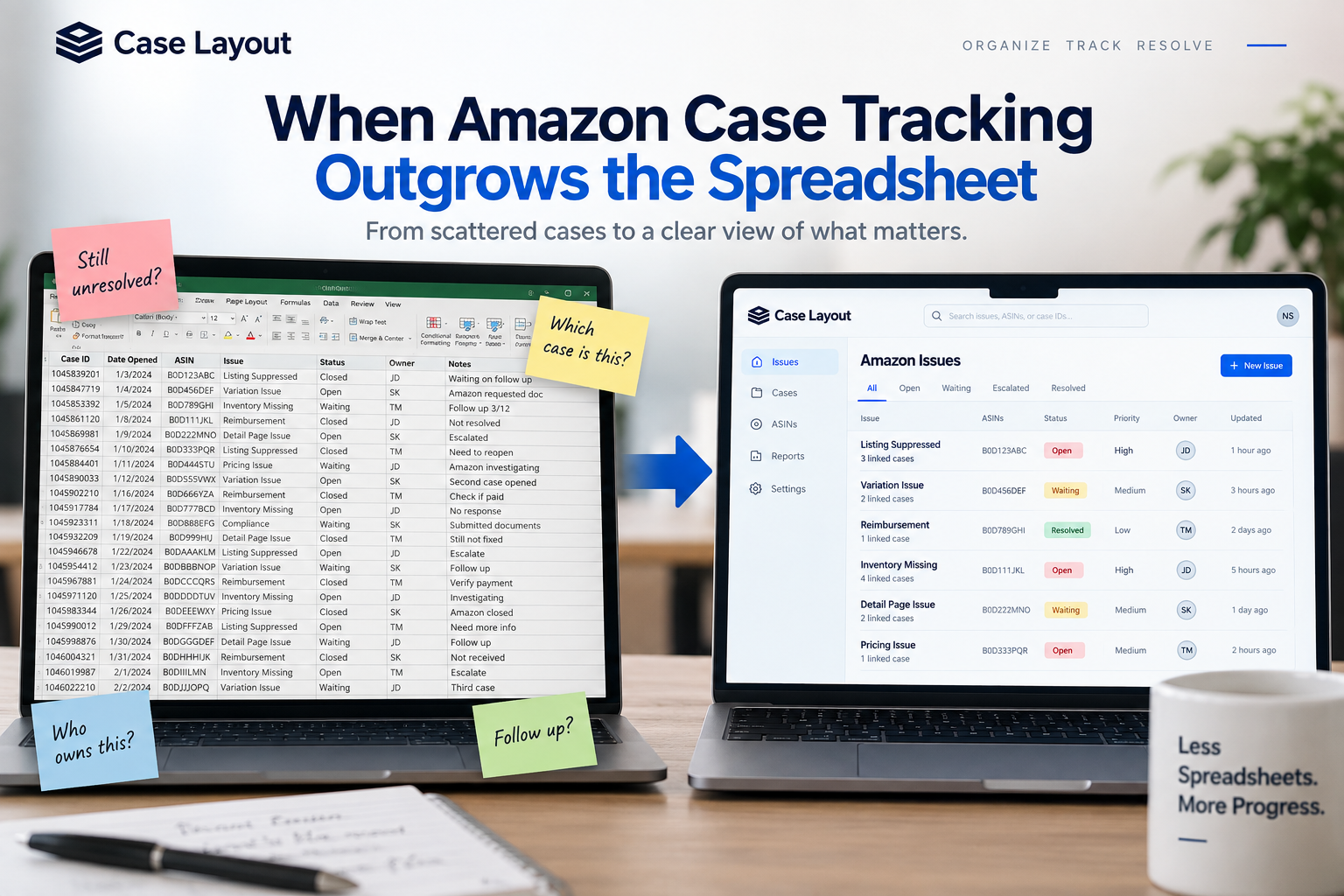
For many Amazon businesses, the first case management system isn't software. It's a spreadsheet.
That makes sense. A spreadsheet is inexpensive, flexible, easy to share, and takes only a few minutes to create. You add columns for the Amazon case number, ASIN, date opened, owner, status, and notes. For a smaller Amazon account with a handful of support cases, that may be all you need.
The problem starts when the business grows but the system doesn't.
Eventually, that spreadsheet is expected to do something it was never really designed to do: manage the history, ownership, relationships, documentation, and resolution of complicated Amazon business problems.
At that point, the spreadsheet isn't necessarily a bad tool. Your Amazon operation has simply outgrown it.
The Spreadsheet Usually Starts Simple
Most Amazon case trackers begin with good intentions.
Someone creates a shared spreadsheet with columns such as:
- Amazon case ID
- Date opened
- ASIN or SKU
- Issue type
- Status
- Assigned owner
- Last update
- Notes
Initially, this can work extremely well. Everyone knows where to look, the number of active cases is manageable, and individual issues are relatively easy to understand.
Then the Amazon business grows.
More ASINs are added. More people become involved. The number of support cases increases. Some problems require multiple cases. Other problems remain unresolved for weeks. Screenshots, documents, financial information, and internal conversations begin accumulating around each issue.
The spreadsheet starts getting wider, longer, and more complicated.
Eventually, the tool that was supposed to simplify Amazon case management starts creating its own management problem.
The Notes Column Starts Taking Over
One of the easiest ways to recognize that you've outgrown a spreadsheet is to look at the notes column.
Initially, the notes might contain something simple:
"Waiting for Amazon response."
Then another update is added.
Amazon asks for documentation. Someone sends it. The case is transferred. Another employee follows up. Amazon closes the case without fixing the problem. Your team opens another case.
Before long, the notes field contains an entire history of the issue.
This happens because Amazon problems don't always fit neatly into individual rows of data.
One business issue may involve:
- Multiple Amazon case IDs
- Several affected ASINs
- Screenshots
- Supporting documents
- Financial information
- Internal comments
- Multiple employees
- Several Amazon support teams
- Escalations
- Weeks of communication
A spreadsheet can technically store pieces of this information, but it becomes increasingly difficult to understand the relationships between everything.
When the most important part of your Amazon case tracker becomes a giant notes field, you are no longer really tracking rows. You are trying to manage a workflow.
One Amazon Problem Can Create Multiple Cases
This is where spreadsheets become particularly difficult.
Imagine a variation relationship breaks across an important product family.
Your team opens an Amazon support case.
Amazon responds, but the problem isn't fixed. The case eventually closes.
Your team opens a second case and references the first one. That case gets transferred to another Amazon team.
The problem remains unresolved, so someone eventually opens a third case during an escalation.
How should your spreadsheet represent this?
You could create three separate rows, but now someone reviewing the spreadsheet may assume there are three different business issues.
You could put all three case IDs in one cell, but then it becomes difficult to track what happened within each case.
You could add additional columns for Case 1, Case 2, and Case 3, but what happens when another issue requires five cases?
The fundamental problem is that Amazon case IDs and Amazon business issues don't always have a one-to-one relationship.
One issue can generate several cases.
One case can involve several products.
Several employees can work on the same issue.
The issue can remain open even after Amazon closes the associated case.
Trying to represent all of those relationships inside a flat spreadsheet eventually becomes difficult.
A Spreadsheet Records Information Better Than It Manages Work
Spreadsheets are excellent at storing information.
They're less effective at answering a different question:
What needs to happen next?
Imagine an Amazon case has the status "Waiting on Amazon."
That's useful information, but it doesn't necessarily tell your team what to do.
When should someone check it again?
Who is responsible for checking?
How long should the team wait before escalating?
Did Amazon already respond?
Does another department need to provide documentation?
Has someone verified whether the underlying problem is still happening?
A good case-management process should make the next action clear.
For example:
- Follow up with Amazon tomorrow.
- Upload requested documentation.
- Escalate if no response is received within two business days.
- Verify that the ASIN is purchasable.
- Confirm that the reimbursement was received.
- Review the issue with finance.
- Check whether the catalog correction is live.
This is the difference between recordkeeping and workflow management.
A spreadsheet primarily tells you what has been entered.
A case-management system should also help your team understand what requires attention next.
Ownership Becomes More Important as the Team Grows
Spreadsheets also become harder to manage when multiple employees work on Amazon.
When one person manages the account, ownership is obvious. That person probably owns almost everything.
As the organization grows, responsibility becomes more complicated.
One employee may manage catalog issues. Another handles operations. Finance may own shortage claims and reimbursements. A third-party agency might manage certain marketplace functions.
Now an Amazon issue can involve several people.
Without a clear owner, a dangerous assumption can develop:
Someone else is probably handling it.
Every significant Amazon issue should have one primary owner.
That doesn't mean the owner has to personally perform every task. Other employees may provide documentation, investigate inventory, update content, or communicate with Amazon.
But one person should ultimately be responsible for moving the issue toward resolution.
A spreadsheet can contain an "Owner" column, but as case volume grows, teams need more than a name in a cell. They need visibility into what that owner needs to do next and which issues are becoming overdue.
Information Starts Living Everywhere
Another problem is that the spreadsheet is rarely the only place where information lives.
The Amazon support conversation exists inside Seller Central or Vendor Central.
Internal discussion might happen in Slack, Teams, or email.
Screenshots may be saved on someone's computer.
Financial documentation might live in another folder.
Someone may paste important information into the spreadsheet notes while another employee keeps their own notes somewhere else.
The spreadsheet eventually becomes a map pointing toward information scattered across the organization.
That makes it difficult for someone unfamiliar with the issue to understand what actually happened.
If a manager asks for an update, the person responsible may need to check Amazon, search email, open the spreadsheet, look through internal messages, and find a screenshot before providing an answer.
Multiply that across dozens or hundreds of Amazon issues and the operational cost becomes significant.
Spreadsheets Can Hide Unresolved Problems
One of the biggest risks with spreadsheet-based case management is that unresolved issues can quietly disappear.
A row gets marked "Closed" because Amazon closed the case.
But was the business problem actually resolved?
If the issue involved a suppressed ASIN, did someone confirm that the product became purchasable again?
If Amazon approved a reimbursement, did someone verify that the money was received?
If Amazon said a variation was repaired, did someone actually check the detail page?
If nobody performs that verification, the spreadsheet may show a completed case while the business still has an unresolved problem.
This is why Amazon's case status and your organization's issue status should be treated separately.
Amazon closing the support conversation doesn't necessarily mean your business problem has been fixed.
Spreadsheets Also Lose Institutional Knowledge
There is another problem that doesn't become obvious until someone leaves the company.
An experienced Amazon operator may understand years of account history.
They know that a certain ASIN has experienced the same issue several times. They remember which Amazon escalation eventually worked. They know which documents Amazon requested. They remember which solutions were attempted and failed.
Some of that information may exist in the spreadsheet.
A lot of it may exist only in that employee's memory.
When that employee changes roles or leaves the organization, the next person inherits the Amazon account but not necessarily the knowledge required to manage it.
The same problem can happen at agencies when an account moves from one manager to another.
A structured issue history makes those transitions significantly easier because the history belongs to the organization instead of the individual employee.
Historical Amazon Issues Should Be Searchable
Imagine discovering a variation problem today and being able to immediately find a similar issue from nine months ago.
You can see:
- Which ASINs were affected
- Which Amazon cases were opened
- What Amazon initially said
- What documentation was provided
- Which approaches didn't work
- How the issue was escalated
- What ultimately resolved it
Instead of beginning the investigation from zero, your team begins with everything the organization already learned.
That is one of the biggest differences between simply maintaining a case spreadsheet and building an Amazon issue-management system.
Your historical support activity becomes institutional knowledge.
When Is a Spreadsheet Still Enough?
Not every Amazon business needs specialized case-management software.
If one person manages the account, you rarely contact Amazon support, and most issues are resolved with a single case, a spreadsheet may work perfectly well.
There is no reason to replace a simple system that is working.
The tipping point usually appears when you start experiencing several of the following:
- Multiple employees manage Amazon support issues.
- One business problem frequently generates multiple Amazon cases.
- Your team struggles to understand who owns an issue.
- Important cases aren't followed up on consistently.
- Screenshots and documentation are scattered across different systems.
- Financial issues aren't always tracked through actual recovery.
- Employees regularly search old cases to understand recurring problems.
- Leadership can't easily see which Amazon issues have the greatest business impact.
- Agencies need to manage cases across multiple clients or brands.
- Your team frequently asks, "Didn't we already have this problem before?"
At that point, you're no longer maintaining a simple list of Amazon cases.
You're managing an operational process.
The Goal Isn't to Replace Every Spreadsheet
Spreadsheets remain incredibly useful for Amazon businesses.
The goal shouldn't be to eliminate them.
The question is whether a spreadsheet is still the right tool for this particular job.
Amazon case management becomes difficult when your team needs to connect multiple cases to one issue, preserve historical context, assign ownership, track next actions, organize documentation, and verify that the underlying problem was actually resolved.
Those are relationships and workflows rather than rows and columns.
That's the problem Case Layout was built to solve.
Case Layout gives Amazon teams a dedicated place to organize the underlying business issue, connect related Amazon cases, assign ownership, preserve documentation, maintain a complete history, and track the issue through actual resolution.
Your spreadsheet isn't failing because spreadsheets are bad.
Your Amazon operation may simply have reached the point where a spreadsheet is no longer enough.